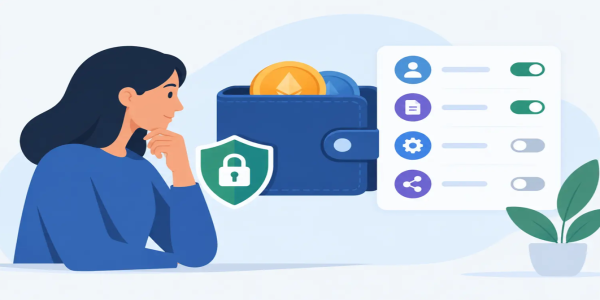
How to Evaluate Wallet Permissions Before You Sign
Learn how to evaluate wallet permissions before you connect, spot risky approvals, limit exposure, and keep control of your crypto assets with confidence.
A wallet prompt can look like a routine click between you and a trade. It is not always routine. Knowing how to evaluate wallet permissions before you approve them is one of the fastest ways to protect your crypto while keeping the freedom to trade, swap, and explore new opportunities on your terms.
Wallet permissions define what a website, smart contract, or connected app can see or do after you approve a request. Some are necessary for a transaction. Others can create a standing authority that remains long after you leave the site. The difference matters when your wallet holds assets you intend to keep.
What Wallet Permissions Actually Mean
When you connect a self-custody wallet to a decentralized app, you may see several types of requests. A connection request usually lets the app view your public wallet address, token balances, and network information. It does not, by itself, give the app permission to move your funds.
A signature request is different. It asks you to cryptographically confirm a message. Many signatures are harmless, such as signing in without a password. But a signature can also approve an order, authorize a future action, or accept terms embedded in typed data. Read what you are signing, especially when the wallet shows a detailed message rather than a simple login request.
The permission with the biggest long-term impact is a token approval. This authorizes a smart contract to spend a specific token from your wallet, often so it can complete a swap or provide liquidity. The contract cannot necessarily take every asset in your wallet, but it may be able to spend the approved token up to the amount you allow.
That is why a transaction can be legitimate at the moment you approve it and still deserve attention afterward. You are not only judging the app. You are deciding how much lasting authority it receives.
How to Evaluate Wallet Permissions Before Connecting
Start with the site itself. Use the official address you intended to visit, not a sponsored search result, random social post, or message sent by an unfamiliar account. Fraudulent sites often copy the appearance of popular trading tools while changing one small character in the domain.
Then pause before selecting Connect Wallet. Ask what the app needs to do for your immediate goal. If you only want to check prices or inspect a collection, a wallet connection may not be necessary. If you are making a swap, connecting and approving the token used for the swap can be reasonable. If a simple task suddenly requires broad permissions, an unfamiliar signature, or multiple approvals, step back.
The best permission is usually the narrowest permission that allows the transaction to happen. Trading without unnecessary barriers should not mean approving blindly. Real financial freedom includes the ability to say no when a request exceeds the job at hand.
Check the Request Type, Not Just the Button
Wallet interfaces may show buttons such as Connect, Sign, Approve, Confirm, or Permit. They are not interchangeable.
A connection reveals public wallet information to the app. A signature confirms a message or authorization. An approval grants a contract spending power over a token. A transaction sends something onchain and usually costs network fees. Treat each prompt as a separate decision, even when several appear one after another.
Be especially alert to requests that use technical labels without a plain-language explanation. Terms such as setApprovalForAll, permit, delegate, or increaseAllowance are not automatically malicious, but they deserve a closer look. If you cannot tell what a prompt authorizes, reject it until you can verify the action independently.
Look Closely at the Spender Address
For token approvals, your wallet should identify the token and the spender, which is the smart contract receiving permission. The displayed contract address is more useful than a project logo. Logos can be copied. An address is fixed.
Compare the spender with the official contract information from a source you trust. If the address does not match, do not approve. If the wallet warning says the contract is unverified, newly deployed, or associated with suspicious activity, treat that as a serious reason to stop.
This check takes less time than recovering from a drained wallet, and recovery is often impossible once funds move onchain.
Set a Realistic Spending Limit
Many apps request unlimited token approval because it makes future trades faster. That convenience has a trade-off. An unlimited approval means the approved contract may spend that token repeatedly, up to your available balance, until you revoke the permission.
For an established app you use frequently, unlimited approval may be a calculated convenience choice. For a new platform, a one-time trade, or a contract you have not fully checked, use a custom amount close to what you plan to spend. You may pay an additional transaction fee next time you trade, but you reduce the amount exposed if something goes wrong.
There is no single rule for every trader. Active users may prioritize speed on trusted contracts. Privacy-conscious or opportunity-driven traders exploring new markets may prefer tighter limits and separate wallets. The point is to make the trade-off deliberately.
Red Flags That Deserve an Immediate Rejection
A legitimate trading experience should make sense from the request through the result. Walk away when the wallet prompt and the action you intended do not match. Watch for these warning signs:
- A site asks for your seed phrase, private key, or recovery words. No legitimate wallet connection needs them.
- A simple login asks you to approve token spending or sign a transaction that transfers assets.
- The approval amount is unlimited when a custom amount is available and you only need a small trade.
- The wallet shows an unfamiliar recipient, token, chain, or contract address.
- A pop-up creates urgency with countdowns, claims you will lose funds, or pressures you to "verify" a wallet immediately.
- The request appears after you followed a link from a direct message, fake support account, or unsolicited airdrop.
One red flag does not always prove a scam, but it is enough to pause. Crypto transactions are designed to be direct. That is powerful when you control the decision and unforgiving when you rush it.
Use Separate Wallets for Separate Levels of Risk
The simplest practical defense is wallet separation. Keep your long-term holdings in a wallet that rarely connects to new apps. Use another wallet for active trading, token claims, NFT activity, experimental protocols, and other higher-frequency actions.
Think of it like carrying spending money instead of bringing your entire savings account to every purchase. Your active wallet can hold the amount you are prepared to use. Your storage wallet stays disconnected from routine approvals.
This approach does not replace careful review. A trading wallet can still be drained if you approve a malicious contract. But separation limits the blast radius of a bad decision and makes daily market access feel less risky.
Hardware wallets add another layer because they require you to confirm actions on a separate device. They are particularly useful for larger balances. Still, a hardware wallet cannot protect you from approving a harmful transaction you did not understand. It confirms your intent, so make sure the intent is clear before you confirm.
Review Existing Approvals Regularly
Permissions are not a one-time issue. Token approvals can remain active for months or years, including after you stop using an app. Review them periodically, especially after trying a new decentralized exchange, claiming tokens, using a bridge, or connecting to a fast-moving trading opportunity.
Look for approvals with unlimited amounts, contracts you no longer recognize, and tokens you no longer plan to trade. Revoke permissions that no longer serve a purpose. Revoking usually requires an onchain transaction and a network fee, but it removes the contract's future spending authority.
You do not need to revoke every approval after every trade. Constant revocation can become expensive and inconvenient. A sensible habit is to review permissions after high-risk activity and on a regular schedule, such as once a month or whenever you move significant funds.
Keep Speed Without Giving Up Control
Fast access is valuable when markets move. The answer is not to avoid every wallet connection or treat every decentralized tool as dangerous. The answer is to build a repeatable approval routine that takes seconds: verify the site, identify the request, check the contract, limit the amount, and confirm only when the action matches your plan.
Platforms such as Budrigan Market are built for traders who value direct access and fewer obstacles between a decision and a trade. Your wallet habits should support that same independence. Keep your approvals intentional, your active balances measured, and your recovery phrase completely offline.
The next time a wallet asks for permission, do not let the speed of the market choose for you. Take the extra moment, read the request, and give only the authority your next move actually requires.
Share This Post
Recent Posts
-
Crypto Dollar Cost Averaging Guide for Freedom
10 Nov 2026
-

Crypto Market Trends That Could Shape 2026
10 Nov 2026
-

Crypto Risk Management for Smarter Fast Trades
10 Nov 2026
-
How to Protect Seed Phrases Offline Safely
10 Nov 2026
-