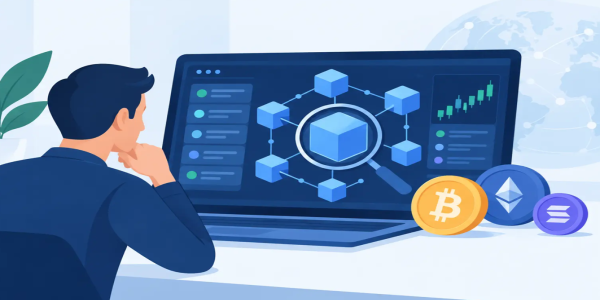
Guide to Blockchain Explorers for Traders
Use this guide to blockchain explorers to verify transfers, inspect wallet activity, track tokens, and trade with more confidence and control every day.
A transaction says it was sent. Your wallet balance has not changed yet. The token price is moving, and waiting on support is not the move. A guide to blockchain explorers gives you a direct way to check what happened on-chain, using public data rather than assumptions.
For independent traders, that visibility matters. Blockchain explorers let you verify deposits, confirm withdrawals, review wallet activity, and see the exact status of a transfer before making your next decision. They are one of the simplest tools for keeping control of your crypto.
What Is a Blockchain Explorer?
A blockchain explorer is a search tool for a specific blockchain. Think of it as a public transaction record with a search bar. You can enter a wallet address, transaction hash, block number, or token contract address to view data recorded on that network.
Bitcoin, Ethereum, Solana, Tron, BNB Smart Chain, and other networks each have their own explorers or compatible explorer tools. The important rule is simple: use an explorer that matches the network your transaction used. An Ethereum explorer cannot confirm a transfer made on Tron, even if the asset name looks identical.
Explorers do not control your funds, reverse transactions, or recover a mistaken transfer. They report what the blockchain has already recorded. That distinction makes them powerful. You are checking the ledger yourself, without relying only on an exchange notification or a sender's screenshot.
Guide to Blockchain Explorers: The Details That Matter
The fastest way to use an explorer is to start with the transaction hash, often called a TXID or transaction ID. This is a unique string created when a transaction is broadcast to the network. Paste it into the explorer search field to see whether the transfer is pending, confirmed, failed, or completed.
A wallet address works differently. Searching an address shows its on-chain history, including incoming and outgoing transactions, token holdings, and often interactions with smart contracts. This can help you confirm that funds arrived at the correct destination or review activity before sending another payment.
Read the transaction status first
When you open a transaction, look at its status before anything else. A pending transaction has been broadcast but is still waiting for validators to include it in a block. A successful transaction has been accepted and executed by the network. A failed transaction reached the network but did not complete as intended, often because of a smart-contract issue, insufficient gas, or a rejected contract condition.
Confirmation count adds context. One confirmation may be enough for a low-risk transfer on some networks, while an exchange or wallet provider may require more before crediting a deposit. Faster chains can confirm quickly, but congestion, network rules, and the platform receiving the funds can still affect when your balance becomes available.
Check the sender, recipient, and network
A successful transaction is not automatically a successful deposit. Check that the receiving address exactly matches the destination address you were given. One wrong character can send assets somewhere else, and blockchain transactions usually cannot be undone.
Also confirm the network. USDT, for example, can exist on several networks. Sending a token through the wrong network may create a recovery problem or make the funds inaccessible to the intended recipient. The token ticker alone is not enough. The chain and token contract matter.
Understand fees without overcomplicating them
Explorers show the network fee paid to process a transaction. On smart-contract networks, you may see gas price, gas used, and gas limit. These figures explain what the network charged, not necessarily every fee charged by a trading platform or wallet service.
A higher fee can sometimes move a transaction through a busy network faster, but it depends on the chain and the wallet settings used when it was sent. Do not chase fees blindly. First confirm whether the transaction is truly pending, whether it can be replaced, and whether your wallet supports changing the fee.
How to Verify a Crypto Deposit or Withdrawal
When moving funds, follow a short verification routine instead of refreshing your account balance repeatedly. Start by copying the transaction hash from the sending wallet or trading platform. Then open the correct network explorer and search the hash.
Confirm these five details:
- The transaction status shows successful or confirmed.
- The recipient address matches the intended deposit address.
- The asset and token contract are the ones you meant to send.
- The transfer amount is correct after any displayed network fee.
- The required confirmations have been reached.
If all five look right but the deposit has not appeared, the receiving platform may still be processing confirmations or crediting balances internally. In that case, keep the transaction hash. It is the clearest proof of the transfer and the first detail support teams will need.
For withdrawals, the same process protects you from confusion. A platform may mark a withdrawal as processed once it has broadcast the transaction, while the blockchain may still show it as pending. The explorer tells you the network-side reality.
Wallet Activity Is Public, Identity Is Not Always Obvious
A common mistake is believing a blockchain explorer reveals the person behind every address. Usually, it does not. It reveals addresses, transfers, timestamps, balances, and contract interactions. Some addresses may be publicly labeled as exchanges, protocols, or known services, but many are not tied to a verified real-world identity.
That creates both freedom and responsibility. Public ledgers provide transparency, yet your activity can still be analyzed when addresses are reused or connected through transactions. If privacy matters to you, avoid posting your wallet address casually, verify addresses before every transfer, and understand that different chains and wallets expose different levels of transaction detail.
An explorer is also useful for checking a wallet before a peer-to-peer transaction. You can see whether an address has prior activity and whether the sender actually initiated the transfer they claim to have made. It is not a guarantee of trustworthiness, but it is stronger evidence than a cropped image or a message saying, “Funds are on the way.”
Use Explorers to Avoid Costly Token Mistakes
On networks that support tokens and smart contracts, an explorer can show the official contract address for an asset. This is critical because scammers can create tokens with familiar names and symbols. A token called USD Coin or Bitcoin on a random contract is not automatically the recognized asset you intended to buy or receive.
Before adding a token to a wallet or trading a newly discovered asset, check its contract address from a reliable source you already trust. Then compare that address character by character with the explorer record. Review token holders, recent transfers, liquidity signals where available, and the contract's age. None of these signals proves a token is safe, but they can expose obvious red flags.
Be especially cautious with wallet transactions you did not initiate. Scam tokens and small unsolicited deposits can be used to attract attention or imitate prior transaction history. Do not interact with unknown contracts just because they appear in your wallet. A visible token balance is not the same as a verified opportunity.
Smart Contracts Need a Different Kind of Attention
When you swap tokens, stake assets, mint an NFT, or approve a decentralized application, you are often interacting with a smart contract instead of sending a simple payment. The explorer may show contract calls, event logs, and token approvals.
The most important item for everyday traders is the token approval. An approval can allow a contract to spend a specified amount of a token from your wallet. Some approvals are limited to a single amount; others may grant a very large or unlimited allowance. Read what you are approving before you confirm it.
If you no longer use a protocol, consider reviewing and revoking unnecessary permissions through a trusted wallet-management process. This does not erase past transactions, but it can reduce exposure from old approvals. Convenience has a cost, especially when you sign transactions in a hurry.
Build Explorer Checks Into Every Trade
You do not need to become a blockchain analyst to benefit from this data. Use explorers as a practical checkpoint whenever money moves. Before depositing, confirm the network. After withdrawing, save the transaction hash. Before accepting a P2P payment, verify the transfer on-chain. Before touching an unfamiliar token, inspect the contract rather than trusting the name.
Platforms such as Budrigan Market are built for traders who value speed and direct market access, but fast execution works best when paired with independent verification. The blockchain explorer is your receipt, your status tracker, and your reality check.
Keep a clean record of your transaction hashes and treat every address like a bank account number that cannot be corrected after the fact. A two-minute explorer check can protect a trade, settle a dispute, and keep your next move focused on opportunity instead of recovery.
Share This Post
Recent Posts
-
Limit Orders Versus Market Orders Explained
18 Nov 2026
-
Practical Guide to Blockchain Address Hygiene
18 Nov 2026
-
Hot Wallets Versus Cold Wallets for Traders
18 Nov 2026
-
Why Do Crypto Spreads Widen When Markets Move?
18 Nov 2026
-
Crypto Spreads and Your Real Trading Cost
17 Nov 2026