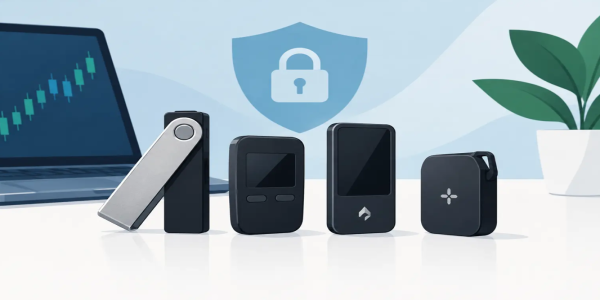
Hardware Wallet Comparison for Independent Traders
Use this hardware wallet comparison to choose cold storage for Bitcoin, altcoins, and daily trading while keeping recovery and access in your hands alone.
A hardware wallet is not a trading account. It is the device that keeps the keys to your crypto away from browser extensions, phishing pages, and compromised phones. This hardware wallet comparison focuses on what independent traders actually need: secure self-custody, support for the assets they move, and a recovery process they can manage without surrendering control.
For active crypto users, the right choice is rarely the wallet with the longest feature list. It is the one you can verify, back up correctly, and use confidently when it is time to move funds. Cold storage should create freedom, not another layer of confusion.
Hardware Wallet Comparison: What Really Matters
Every hardware wallet stores or protects access to your private keys offline. When you send crypto, the transaction is prepared on a connected device, then reviewed and approved on the wallet itself. That physical confirmation is the point. A malicious app may try to change a destination address, but a careful user can catch it on the hardware wallet screen before signing.
The trade-off is convenience. A hot wallet on your phone can be faster for small, frequent transfers. A hardware wallet asks you to connect a device and confirm each action. For long-term holdings, larger balances, and funds you are not actively trading, that extra step is a feature, not friction.
When comparing options, focus on five practical questions:
- Does it support the coins and networks you actually use?
- Can you clearly read and verify transaction details on its screen?
- How does it connect: USB, Bluetooth, QR code, or microSD?
- What recovery method does it use, and can you protect the backup?
- Does its price match the value you plan to secure?
Do not buy based on appearance alone. A premium metal case can be useful, but clear transaction verification, reliable firmware practices, and safe recovery are more valuable than a polished finish.
Connection Method: Convenience Versus Attack Surface
Most hardware wallets fall into one of three connection styles. USB wallets connect directly to a computer or phone. They are straightforward, dependable, and often less expensive. For traders who use a desktop setup and want a direct wired connection, this is usually the simplest route.
Bluetooth wallets pair with mobile devices wirelessly. They make mobile portfolio management more convenient, especially when you need to approve a transaction away from your desk. The downside is that wireless connectivity introduces another setting to understand and monitor. Bluetooth does not automatically make a wallet unsafe, but it does mean you should verify every address and amount on the wallet screen, every time.
Air-gapped wallets use QR codes or, in some cases, a microSD card to exchange transaction data without a direct cable or wireless connection. This appeals to users who want maximum separation from online devices. The trade-off is speed. Scanning QR codes is slower than plugging in a cable, and not every trader wants that workflow for regular transfers.
Choose the setup that fits your behavior. If a highly isolated wallet feels too inconvenient, you may avoid using it correctly. Security works best when it is repeatable.
Screen Quality Is a Security Feature
A wallet screen is not just an interface. It is your last checkpoint before a transaction becomes permanent.
Small-screen devices can be secure, but they require more patience when reviewing long wallet addresses. Larger touchscreens make it easier to inspect transaction details, confirm the network, and enter a PIN without relying as heavily on the connected computer or phone. For beginners, this can reduce mistakes. For active users moving between multiple chains, it can save time without sacrificing verification.
Touchscreens also have a practical downside: they tend to cost more, use more power, and create another physical component that can wear over time. Button-based wallets are often less flashy but remain popular because they are simple and durable.
The winning choice is the one that makes you slow down long enough to verify the destination address. Crypto transactions do not come with chargebacks.
Asset Support: Think Beyond the Coin Name
A wallet may support Bitcoin, Ethereum, and thousands of tokens, but that does not mean every asset works the way you expect. Token support depends on the underlying network, the wallet software, and whether you can manage that asset directly through the wallet's companion app or through a compatible third-party wallet.
Before buying, list the assets you hold and the networks you use. This matters especially for stablecoins. USDT or USDC on Ethereum, Tron, Solana, Polygon, and other networks are not interchangeable. Sending a token over the wrong network can create a costly recovery problem.
Bitcoin-focused users may prefer a device built around Bitcoin security and simple transaction handling. Multi-asset traders need broader network support, token visibility, and compatibility with decentralized applications. Neither approach is universally better. A narrow tool can offer clarity. A multi-chain wallet can offer flexibility.
If you trade frequently through an exchange and transfer profits to cold storage, you do not need every experimental token supported on day one. You need reliable support for the assets you intend to hold, plus the ability to confirm the correct network before withdrawing.
Recovery Seed: The Part That Cannot Be Replaced
Your recovery seed is the real master key. Usually presented as 12 or 24 words, it can restore access to your wallet on a compatible device if the original is lost, damaged, or stolen. Anyone who has those words can take the funds. There is no customer support team that can reverse that outcome.
Write the seed down by hand during setup. Never store it in a screenshot, cloud drive, email draft, notes app, or password manager connected to the internet. Avoid typing it into a website. A legitimate hardware wallet will not ask you to enter your complete recovery phrase into a browser or mobile app after setup.
Paper works for a modest balance if it is stored securely and protected from water and fire. Metal backup plates are worth considering for larger holdings or long-term storage. Do not get creative with hidden word substitutions unless you fully understand your method. A backup that confuses you can be just as dangerous as no backup at all.
Some wallets support an optional passphrase, sometimes called a 25th word. This can create a separate hidden wallet, but it adds real complexity. Forget the passphrase and the seed alone will not restore those funds. Use this feature only after testing your recovery process with a small amount.
Open Source, Secure Elements, and Trust
Wallet buyers often encounter debates about open-source code and secure elements. Both matter, but neither is a shortcut to perfect security.
Open-source software allows independent researchers and users to inspect code more closely. This can improve transparency and identify issues faster. However, code being open does not guarantee that every user understands it or that every hardware component is independently verifiable.
A secure element is a specialized chip designed to protect sensitive key material from physical extraction attempts. It can strengthen resistance to certain attacks, though its design may involve proprietary components. Some wallets prioritize open designs, while others prioritize certified secure hardware. The better question is whether the manufacturer clearly explains its security model, publishes updates responsibly, and gives you a device that requires on-device confirmation.
Avoid choosing based on tribal arguments. A strong wallet is only one part of the system. Your PIN, recovery backup, transaction habits, and purchase source matter just as much.
Buying and Setting Up Without Avoidable Risk
Buy hardware wallets directly from the manufacturer or an authorized retailer. Avoid used devices, marketplace listings with uncertain handling, and devices that arrive with a prewritten recovery phrase. A new wallet should generate its recovery seed during your own setup process. If someone gives you the seed, they may already control the wallet.
When your device arrives, inspect the packaging but do not depend on shrink wrap as proof of safety. Follow the manufacturer’s genuine-device verification process, update firmware only through the official companion software, and create a strong PIN. Then send a small test amount before moving a meaningful balance.
This test is not wasted time. It proves that you can receive funds, send funds, read the device screen, and access the correct account. Before relying on a wallet for serious storage, practice restoring the seed on a spare device or through a documented recovery procedure. Do this privately and without exposing the words to a camera or screen recording.
Which Hardware Wallet Fits Your Trading Style?
If you mostly hold Bitcoin or a small set of major assets, prioritize a clear security model, reliable recovery, and a simple wired workflow. You do not need a complicated device to protect a straightforward portfolio.
If you move assets across chains, use stablecoins, or interact with decentralized finance, prioritize multi-chain support and a screen that makes transaction review easy. Make sure the wallet supports the specific networks you use, not merely the token ticker.
If privacy and isolation are your highest priorities, an air-gapped workflow may be worth the slower process. If you need mobile flexibility, Bluetooth can be practical when paired with disciplined on-device verification. For users withdrawing trading gains from Budrigan Market or another platform, the strongest habit is simple: confirm the network, test the address, and move only after the device display matches your intent.
Your hardware wallet should not be chosen by hype or fear. Choose the device that protects your keys without creating a workflow you will ignore. Set it up carefully, secure the recovery phrase offline, and make your first transfer small. Financial freedom starts with control that you can actually maintain.
Share This Post
Recent Posts
-
Wallet Backup Methods That Keep Crypto in Reach
26 Oct 2026
-

Slippage Cost Reduction for Faster Crypto Trades
26 Oct 2026
-

-
Can Crypto Transactions Reverse? What to Do Next
26 Oct 2026
-
Why Crypto Prices Differ Across Exchanges
22 Oct 2026