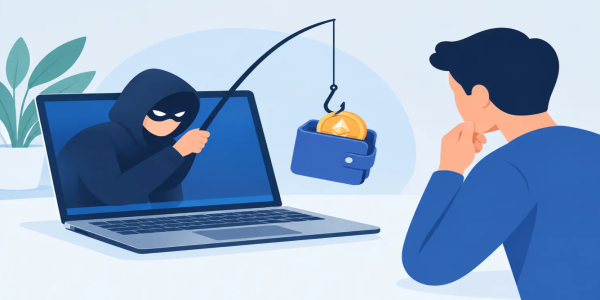
Wallet Phishing Attack Example: Spot the Trap
See a wallet phishing attack example, learn the warning signs, and protect your crypto before a fake prompt turns one careless click into a loss forever.
A wallet phishing attack example rarely starts with an obvious threat. It starts with a message that feels urgent: a claimed airdrop, a security alert, a support reply, or a chance to claim tokens before the window closes. One click can send you to a polished fake page built to separate you from your crypto.
Freedom in crypto means controlling your assets and your decisions. That control is powerful, but it also means there is no bank call center that can reverse a transaction after a scammer gets access. Learn how these traps work, slow down at the right moment, and keep your wallet in your hands.
A Wallet Phishing Attack Example, Step by Step
Imagine you see a post on social media saying a token you hold has launched a surprise reward program. The post uses the correct logo, similar language, and a profile name that looks almost identical to the real project. It tells holders to connect a wallet and claim before the allocation expires.
You tap the link. The page looks convincing. It has a countdown clock, token graphics, recent activity notifications, and a Connect Wallet button. After connecting, a pop-up asks you to sign a message to verify ownership. The message may appear unreadable, technical, or harmless. You approve it because you believe signing is not the same as sending funds.
That is where the attack can change direction. The next request might ask for a token approval that gives a malicious contract permission to move a particular asset. In more aggressive cases, the page prompts you to sign a transaction that transfers assets immediately or grants broad permissions over NFTs. The scammer does not need your wallet password if you authorize the action yourself.
Another version is even more direct. The fake page claims it cannot complete your reward unless you enter your recovery phrase. It may call the phrase a backup key, security phrase, wallet sync code, or verification phrase. The label changes. The rule does not: anyone asking for your recovery phrase is trying to take control of your wallet.
Why Smart Wallet Phishing Works
Most phishing attempts do not rely on advanced hacking. They rely on speed, familiarity, and pressure. Crypto users move quickly because markets move quickly. A trader who would carefully inspect a bank transfer may rush through a wallet request after seeing a limited-time offer.
Scammers also understand that wallet prompts can be confusing. A signature, approval, network switch, and transaction confirmation may all appear in the same session. If you do not know exactly what a prompt does, a professional-looking website can make a dangerous request feel routine.
The strongest scams borrow trust from real brands and real communities. They impersonate exchange support, wallet providers, token projects, influencers, or P2P sellers. Sometimes they enter a public chat and respond to users before the legitimate team can. Sometimes they buy ads that place fake websites above the real result. A verified-looking profile is not proof that a link is safe.
The Warning Signs Before You Connect
A scam page often exposes itself through small details. The domain may have one extra letter, a different ending, or a hyphen where the real site has none. The page may pressure you with a countdown, promise unusually high rewards, or say your funds are frozen unless you act immediately.
Be especially cautious when a site asks you to do any of the following:
- Enter your recovery phrase, private key, or wallet backup.
- Approve unlimited spending for a token you do not recognize.
- Sign a message or transaction you cannot explain.
- Download a browser extension, mobile profile, or remote-access tool.
- Move assets to a “safe wallet” because of a claimed security incident.
Legitimate support teams do not need your recovery phrase to help you. A real platform will not ask you to share private wallet credentials in a direct message. And no valid airdrop needs you to surrender control of existing funds to receive new ones.
Urgency is another giveaway. “Act now” language can be real in trading, but it is also a scammer’s favorite weapon. Market opportunities come and go. Your private keys should never be rushed.
Read Wallet Prompts Like a Trader
Before approving anything, pause and identify the action. Is your wallet asking you to connect, sign a message, approve token access, or submit a transaction? These are not interchangeable.
Connecting a wallet allows a site to view your public address and request further actions. It does not automatically give the site access to your assets. A signature may be used for login, but certain signatures can also authorize actions depending on the format and application. An approval gives a smart contract permission to spend a specified token, often up to a set amount. A transaction changes something on-chain and usually costs network fees.
Do not approve a prompt simply because it is labeled “verify,” “continue,” or “claim.” Look at the wallet screen itself, not only the website behind it. Review the receiving address, the token amount, the network, and the permission being requested. If the information is unclear, reject the request and investigate from a fresh browser tab.
This is not about being paranoid. It is about operating with the same discipline you use when setting an entry, checking a pair, or confirming a P2P counterparty. A few seconds of verification can protect years of accumulated assets.
Protect Your Wallet Without Giving Up Speed
Security does not have to mean giving up access to the market. Build a simple system that lets you move quickly with less exposure.
Use a separate wallet for new dApps, unfamiliar claims, and experimental token activity. Keep your long-term holdings in a wallet that does not connect to random sites. If an experimental wallet is compromised, the damage is contained instead of reaching your primary balance.
Save official websites as bookmarks after confirming them through trusted channels. Avoid entering exchange names or wallet brands into a search engine and clicking the first ad. When support is needed, start from the platform’s official interface rather than responding to a direct message or a comment reply.
A hardware wallet can add a valuable confirmation layer for larger balances because it requires you to review and approve actions on a separate device. It is not a magic shield, though. If you approve a malicious transaction on the device, the transaction can still execute. The real advantage is the extra moment it gives you to inspect what you are signing.
Keep your recovery phrase offline, private, and written exactly as generated. Do not store it in cloud notes, email drafts, screenshots, or chat messages. Split storage can reduce some physical risks, but it can also create a recovery problem if you overcomplicate your setup. Choose a method you can maintain securely and reliably.
For active trading, use strong unique passwords, enable available account security features, and protect the email account tied to your trading activity. A compromised email can become the first step toward account recovery abuse, password resets, and impersonation.
What to Do If You Clicked a Suspicious Link
Clicking a link alone does not always mean funds are gone. The critical question is what you approved, signed, entered, or downloaded afterward. Do not panic, but act fast and deliberately.
If you entered a recovery phrase or private key anywhere suspicious, assume the wallet is compromised. Create a new wallet using a trusted method and move remaining assets to the new address as soon as possible. Do not reuse the old recovery phrase, even if the wallet appears normal afterward.
If you approved a suspicious token permission, review and revoke that permission using a trusted wallet security tool or the relevant block explorer’s verified features. If you signed or sent an unknown transaction, check your wallet activity, identify what moved, and transfer any remaining assets out of harm’s way when appropriate. Network fees and transaction timing matter, so prioritize valuable assets first.
If you downloaded software or gave remote access to someone, disconnect the device from the internet and run a full security check. Change passwords from a clean device, especially for your email and exchange accounts. Report impersonation profiles and fraudulent pages so fewer traders get pulled into the same trap.
Trade With Control, Not Panic
Crypto gives you direct access to markets, assets, and opportunity. That is the advantage. It also makes every approval your responsibility. The goal is not to avoid every new token, wallet, or trading opportunity. The goal is to know what you are authorizing before you authorize it.
At Budrigan Market, traders who value fast access should pair that speed with clear wallet habits: verify the destination, question unexpected prompts, and protect the credentials that control your assets. The best trade is never worth a rushed signature you do not understand.
When a message promises easy money, urgent recovery, or exclusive access, take one extra minute. Real opportunities can survive a careful check. A phishing trap depends on you not taking that minute.
Share This Post
Recent Posts
-

-

7 Token Research Tools for Smarter Crypto Trades
01 Nov 2026
-
Stablecoin Settlement Options for Faster Trading
01 Nov 2026
-
10 Best Blockchain Security Habits for Traders
01 Nov 2026
-
Wallet Backup Methods That Keep Crypto in Reach
26 Oct 2026